WooCommerce: How to Sell ANYTHING with WordPress (WP Dublin 2018)

I had the pleasure to speak at the Dublin WordPress Meetup in March 2018. The presentation title was “How to Sell A-N-Y-T-H-I-N-G with WordPress + WooCommerce”, aimed at both beginners and more advanced designers.

Some of those who are only starting with WordPress didn’t know you can transform ANY WordPress install into an Ecommerce website in a matter of minutes.

Those who are pretty familiar with it, on the other end, they’re maybe entrepreneurs who want to set up a Marketplace, a Membership site, a Classified Ads platform or implement some of those Ecommerce features only Amazon and Ebay seem to be able to code with their million dollar budgets. Continue reading WooCommerce: How to Sell ANYTHING with WordPress (WP Dublin 2018)

WooCommerce: How to Show Product Search Suggestions?

“Ajax Search” (displaying product search suggestions while a WooCommerce user is typing something in the search bar), is a brilliant idea for all of you ecommerce entrepreneurs.

Saving time to a potential customer is your number one goal. Besides, if your website has a lot of traffic, search should be one of your sales propositions (look at Amazon and eBay to see how prominent the search bar is).

Enabling “Ajax Search” in WooCommerce is actually pretty easy. This time, there is no snippet, but a good combination of free and premium plugins that do the job.

Please note – in this article we will be covering the “Ajax Search” plugins and not the product filtering ones, which are fairly different in regard to the functionality they provide.

So, what are the most reliable “Search Suggestion” plugins for WooCommerce?

Continue reading WooCommerce: How to Show Product Search Suggestions?

WooCommerce: Multi-Vendor / Marketplace Solutions

Building the next Amazon is everyone’s dream.

Allowing sellers to use your online platform to reach wider audiences without holding stock, investing in shipping and warehousing and – let’s be honest – with a few dollars budget… is actually possible in WooCommerce.

The WooCommerce Multi-Vendor/Marketplace scenarios are many – not a surprise. And sometimes, a plugin is all you need to build an Etsy-alike website. Not bad for a small investment – you can focus on the marketing while the WooCommerce plugin does the rest.

However, building a full website, no matter its project specifications, is never easy. Many WooCommerce and ecommerce entrepreneurs underestimate how much work, caution, attention, patience and money are needed to develop an online marketplace.

Nothing is free – if something looks doable with a $79 plugin you also need to consider the cost of time, outsourcing, marketing and third parties (such as picking a reliable hosting).

Anyway, today we’ll take a look at some of the best plugins for turning a WooCommerce website into a multi-vendor marketplace, as well as a simple PHP snippet that might just be enough for you. Enjoy!

Continue reading WooCommerce: Multi-Vendor / Marketplace Solutions

WooCommerce: How to Create a Custom Product Type (Simple, Variable, etc.)

Ever wondered how you could add a new product type to the WooCommerce admin (on top of the default Simple, Variable, Grouped and External) – and conditionally display product data tabs such as “General”, “Shipping”, “Linked Products”, “Advanced” whenever this is selected?

Well, while I was coding this for a client I found a lot of literature online – but nothing really worked for the latest WooCommerce release, especially in regard to the JS that is necessary to hide/show the Product data tabs and options.

So, here’s the working fix!

Continue reading WooCommerce: How to Create a Custom Product Type (Simple, Variable, etc.)

WooCommerce AMA with Rodolfo Melogli (Ask Me Anything Woo #1)

I am Rodolfo Melogli, founder of Business Bloomer, WooCommerce development expert, WordPress freelancer, WordCamp speaker, content marketing geek and (like you) small business owner.

This is the first ever WooCommerce AMA (Ask Me Anything) session on Business Bloomer. Rodolfo Melogli will be donating 72 hours of his time and will be available to answer your WooCommerce questions, live, from March 13th until March 15th 2018. Use the comment section below to post your WooCommerce questions.

So, which WooCommerce questions should you ask? Well, here are a few ideas: plugin suggestions, how-to, customization, ecommerce, content marketing, freelancing, speaking, SEO, CRO, business in general – as long as it’s WooCommerce-related!

You can ask your questions in the comment section below and have them answered during the live AMA.

View All WooCommerce Questions & Answers

WooCommerce: Display Order Delivery Date @ Checkout

Here’s how you can add a “calendar” field on the WooCommerce checkout page, let people decide the delivery date, and save this value in the order.

It took me ages to implement this for a client (it was much more complex, with available dates, different calendars based on different shipping zones, max weight per day, etc) so I thought of sharing the basic snippet with you! Enjoy 🙂

Continue reading WooCommerce: Display Order Delivery Date @ Checkout

WooCommerce: Display Prices as “Was $$$ – Now $$$ – Save $$$”

Many retailers use this price tag strategy quite successfully. And displaying the amount of savings can increase your ecommerce store conversion rate as well 🙂

So, turning simple product default pricing from “$30 $20″ to “Was $30 – Now $20 – Save $10” is quite easy. With a little CSS you can also style the display and customize it according to your brand guidelines! Continue reading WooCommerce: Display Prices as “Was $$$ – Now $$$ – Save $$$”

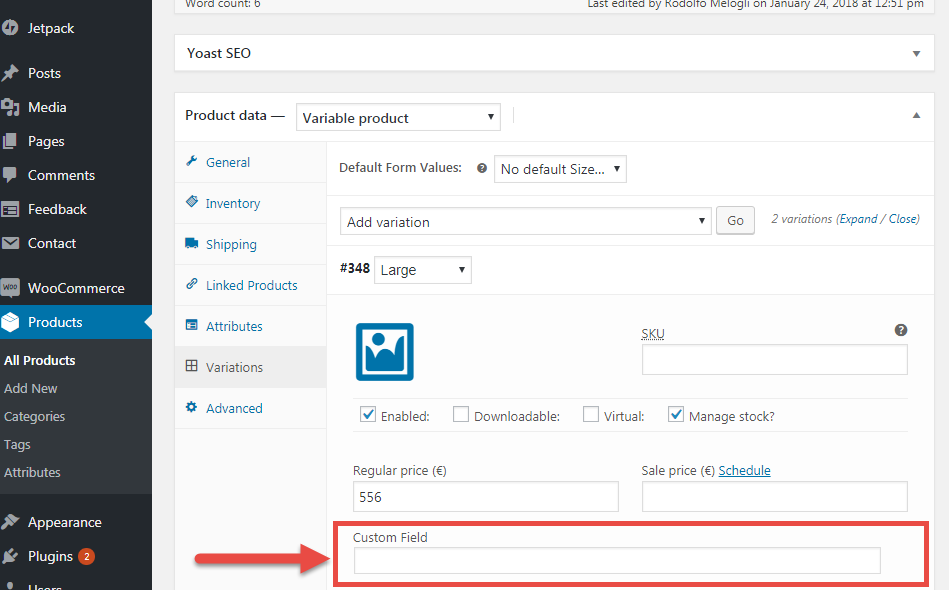
WooCommerce: Add Custom Field to Product Variations

Adding and displaying custom fields on WooCommerce products is quite simple. For example, you can add a “RRP/MSRP” field to a product, or maybe use ACF and display its value on the single product page.

Easy, yes. Unfortunately, the above only applies to “simple” products without variations (or the parent product if it’s a variable product). So the question is: how do we add, save and display a custom field for each single variation?

Continue reading WooCommerce: Add Custom Field to Product Variations

WooCommerce: How do You Sell Gift Cards / Vouchers?

Let’s be honest – if you run a B2C WooCommerce store and you don’t currently sell gift cards, this is the right time to get started.

If you do a quick Google search about “Gift Card Statistics”, you will probably notice a huge trend: gift card sales are on the rise (we’re talking billions), as well as the percentage of customers spending more money than the redeemed amount.

The good news is – you can enable gift cards with a simple click of a button or, alternatively, purchase a premium plugin to get a more efficient, automated, integrated system.

Either way, there is really no excuse: you should start selling gift cards (or “vouchers”) from today, or at least test it away. Sometimes – trust me – ecommerce marketing is pretty simple: see what works (specifically on Amazon and Alibaba), and copy it.

In this post we will analyze different solutions. We’ll see how to use a simple coupon code (oh yes, you can do that), as well as taking a look at the best free and paid plugins out there.

Continue reading WooCommerce: How do You Sell Gift Cards / Vouchers?

WooCommerce: Automatically Update Cart on Quantity Change

There is a lot of literature online that solves this UX problem – so in this article let’s see if I can give you a simplified, working, updated version.

So, do you hate the “Update Cart” button too? Yes, the one you have to click after you update the quantity of a product in the cart…

Well, you’re in the right place: a simple PHP function, two lines of JQuery, one line of CSS (or a mini-plugin) and the result is pretty straight forward!

Continue reading WooCommerce: Automatically Update Cart on Quantity Change

WooCommerce: How to Get Customers to Request a Quote?

Not all WooCommerce websites are born equal. Sometimes a price and an add to cart button are just not enough.

B2B platforms, wholesalers and high-ticket businesses are usually quite flexible with their pricing and might need to give customers the freedom to request a quote.

Correct, WooCommerce can be used as a quoting engine as opposed to a standard ecommerce website (or both can be enabled at the same time if there are two different audiences).

As usual, there are different solutions. In this article, we’ll see how to use a simple code snippet to show a contact form on the single product page, we’ll see which free plugins are available on WordPress.org and – of course – we will also take a look at more advanced, premium extensions.

Either way, the beauty about WooCommerce is that with the click of a button you can customize the way it behaves!

Continue reading WooCommerce: How to Get Customers to Request a Quote?

WooCommerce: Display Out of Stock Products (Shortcode)

A client of mine wanted to show out of stock products on a separate page – so I coded a simple shortcode for you all!

You can use this shortcode for different goals. For example, you might want to display what products you’ve sold to enhance customer trust / social proof.

So let’s see (1) how to create a shortcode and (2) how to take advantage of the existing [products] WooCommerce shortcode and its “ids” parameter to pass just those product IDs that are out of stock!

Continue reading WooCommerce: Display Out of Stock Products (Shortcode)