WooCommerce: How to Increase Average Order Value?

AOV a.k.a. Average Order Value is one of the most important ecommerce metrics. It describes the average order total in a given period of time. If this year your WooCommerce website converted 150 orders and made $30,000 in revenue, your AOV for this year is $30,000/150 = $200 (i.e. on average, you can expect each order to be $200).

FYI, the meaning of AOV is the same for any ecommerce platform, but in this article we’ll talk just about WooCommerce. In our opinion WooCommerce is a better, more cost-effective solution than Shopify or other counterparts.

If you don’t know what your WooCommerce store AOV is, immediately go to WordPress Dashboard > WooCommerce > Reports > Orders > Sales by Date > Year and divide “net sales in this period” by the number of “orders placed”. But be careful – those reports are sometimes not correct (I know WooCommerce is working on this at the moment). Mine is giving me AOV = €2… and I know that’s not right.

Your best bet is your Google Analytics account (as long as you’re using the official WooCommerce – Google Analytics integration) and/or your Metorik reports (here’s an article you should read if you need to know how to install reliable WooCommerce tracking, reporting, filtering and segmentinghttps://businessbloomer.com/advanced-woocommerce-tracking-analytics-reports-exports-segmentation/). My Metorik dashboard tells me my WooCommerce website AOV for this year is €233 so far – I can trust this one for sure.

So the question is: how can we get our WooCommerce customers to spend more? Well, here’s a list of WooCommerce plugin alternatives you can install right now to boost your AOV.

In fairness, who wouldn’t want some extra revenue? 🙂

Continue reading WooCommerce: How to Increase Average Order Value?

WooCommerce: Disable Tracking if Order Failed @ Thank You Page

The “woocommerce_thankyouhook fires on the Thank You page once an order is placed. Most tracking functions like Google Analytics, affiliate commission plugins and other WooCommerce extensions rely on “woocommerce_thankyou” to run their code.

Problem is – “woocommerce_thankyou” is ALSO called if an order fails (i.e. payment did not go through). Now, unless the plugin is smart enough in its own functions to exclude failed orders, which doesn’t happen often I’m afraid, we need to find a way NOT to run “woocommerce_thankyou” if an order fails. Case study: a client uses a third party affiliate plugin, this plugin hooks into “woocommerce_thankyou“, but they don’t want to calculate conversions when an order fails.

So here you go!

Continue reading WooCommerce: Disable Tracking if Order Failed @ Thank You Page

WooCommerce: How To Do Keyword Research?

This is a guest post by Helga Moreno of Ahrefs – if you like the article, make sure to thank her in the comments!

I’m sure all of you know that keyword research is one of the most important SEO activities that is closely related to your WooCommerce website marketing success.

I also have no doubt that you have already studied a heap of articles that include step-by-step instructions on doing expert keyword research aimed at ranking high for thousands of targeted search terms and seriously improving your traffic from Google.

But there is a strange thing about it. Every article gives a bit different instructions. I don’t argue the competence of their authors. The reason for such kind of discrepancy is hidden in the fact that there is no universal approach to doing keyword research.

So what should be taken into account when you do keyword research?

  • Your website’s authority, number of pages, quality of content, etc.
  • Your goals and objectives – branding, exposure, traffic, leads, sales
  • Your budget, resources, and deadlines
  • Your industry and competitive landscape

I guess now you understand the reason why it was so hard to follow the steps of the guides you stumbled upon before.

We will take a different route. I mean I will give you a kind of keyword research framework that you will easily adapt to the goals of your WooCommerce install.

You’ll see that the tactics and methods described below will utterly improve your traffic coming from Google. Continue reading WooCommerce: How To Do Keyword Research?

WooCommerce Advanced Tracking: Analytics, Reports, Exports, Segmentation

If your WooCommerce store already generates a few orders per month, then it’s probably the right time to step up and start analyzing your ecommerce data.

Despite the “WooCommerce > Reports” tab within the WordPress dashboard can give you sales figures, stock takes and customer lists – we all know that’s a very basic, limited functionality. It gives you CSV export but no automation. There are no filters and no segments. It’s accurate but still not enough.

Data plays a vital role on your WooCommerce website. If you can get access to a wider range of figures, reports, screens, calculations, exports, filters, integrations, then it’s very likely you can understand how to increase your profits.

Data can help you identify problems (hello, cart abandonment – biggest responsible for low conversion rates), can help you select popular products for your cross-sell and up-sell strategy, can give you a hint on how to improve the user experience and have them check out faster – as well as giving you a hand analyzing patterns, performances and customer behavior.

In this (very long) post, we’ll take a look at ways to gather ecommerce data beyond the default “Reports” section, generate email digests, print advanced reports, filter and segment orders and customers, and much more. I will be referring to the two biggest tracking software for WooCommerce: Google Analytics and Metorik. Continue reading WooCommerce Advanced Tracking: Analytics, Reports, Exports, Segmentation

WooCommerce: What Are the Must-Use Plugins?

Ah, if only there were a “simple” WooCommerce project! We would all use the same plugins, copy and paste the same content and the world would be all the same 🙂

So, let’s be clear about this question. There is no must-use plugins list for WooCommerce, as each website is custom and therefore needs different functionalities.

Having said that, many WooCommerce developers use a few identical plugins on almost every project, and this post contains an answer to that. Continue reading WooCommerce: What Are the Must-Use Plugins?

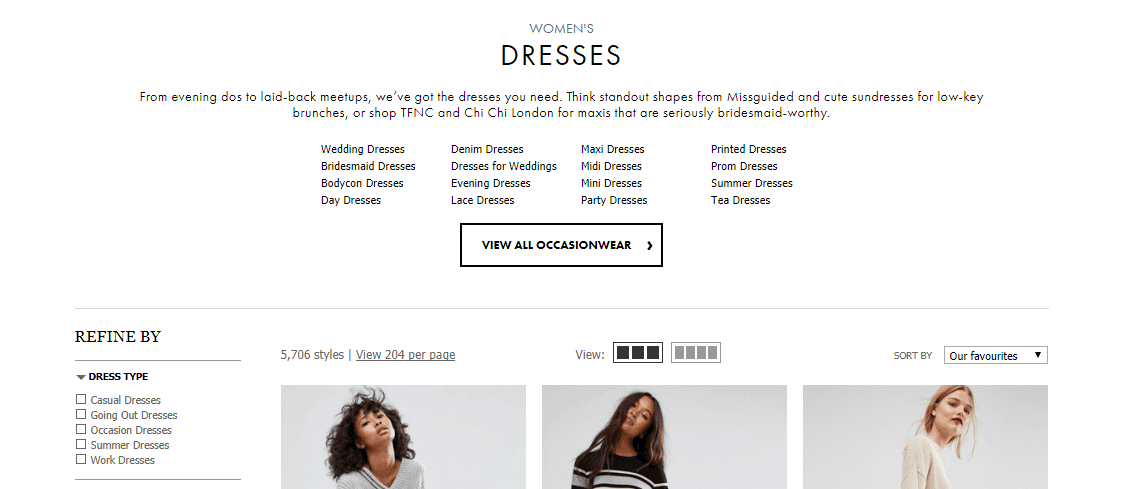
WooCommerce: How Top Brands Design Product Category Pages

eCommerce Category Description

Selling on the web is a highly competitive game. There is no shortage of both customers and competitors. Big companies crush little companies every day. But that doesn’t mean smaller websites doesn’t have any chance.

Smaller companies can beat larger companies if they focus on the right things. For that, you always need to look for opportunities and act smart when it comes to promoting your brand and products.

Leveraging search engines is one of the cheapest ways to bring customers to your website. For that, you need to make sure you are fulfilling the search query. Since Google is always looking for the best fit & best experience for users based on their query.

Category pages or product listing pages are key hub pages in any E-commerce store. Products tend to come and go but categories stay. So it’s better to build up your category pages.

For example, if you are selling necklaces, you have more than one necklace for sure. So rather than 5 necklace pages competing for the same Necklace terms, optimize the category page for necklaces while optimizing the products for specific necklace style (e.g. Crystal Necklaces). Your primary focus should be ranking your category pages for specific key terms.

Most online stores neglect their category pages and organize them in a way that it does more harm than good. If optimized correctly they can bring in good traffic for top level keywords and reap the rewards for months.

Continue reading WooCommerce: How Top Brands Design Product Category Pages

WooCommerce: 85 Free Plugins for Every Challenge

free woocommerce plugins

WooCommerce is one of the most popular WordPress plugin for adding eCommerce or cart functionality to a WordPress website. According to recent research by aheadWorks, WooCommerce now accounts for 26.5% of the total eCommerce market share. And recent acquisition by Automattic indicates that it has a great future ahead.

WooCommerce is well known for its huge flexibility and vast customization options. There are hundreds of WooCommerce plugins or Extensions available for extending the functionality. If you want some recommendations in this direction, check out some of the best free WooCommerce plugins (sorted by number of active install).

Continue reading WooCommerce: 85 Free Plugins for Every Challenge

WordPress: 11 Things to Consider When Selecting a Theme

With seemingly thousands of Free and Premium WordPress themes out there, it can be tricky to pick the right WordPress theme for your business.

While launching a website seems easy, hardest part is finding a theme that meets your content requirement. There is not a single WordPress theme that would meet all the needs of all website owners. Every theme is built for a specific purpose and has its own strengths and weaknesses. Your job is to find the theme that meets your business’s needs.

While there are themes that do it all, they tend to be heavy and bloated because they are designed to meet the requirements of a wide range of website owners. In other words, they do everything but specialize in nothing.

Choosing these resource-consuming and feature-heavy WordPress themes is like getting operated on by a surgeon who has nothing but a Swiss army knife to perform all surgical tasks.

Finding the right WordPress theme requires more than just picking a theme based on look. In this article, we will provide some tips on what to look out for when choosing a WordPress theme. We will also recommend some free tools to help you check a theme’s credibility.

Continue reading WordPress: 11 Things to Consider When Selecting a Theme