WooCommerce: Show SKU @ Cart, Checkout, Order & Emails

When SKU matters to the end user, displaying it in the Cart page, Checkout page, Thank you page, My Account View Order page and Order Emails under the item name is a must.

Ideal for B2B businesses and international brands, this simple customization can help you learn how to add any sort of content under the Cart/Checkout/Order item names. Simply use the same hook and try “getting” something different than SKU with this guide. Enjoy!

Continue reading WooCommerce: Show SKU @ Cart, Checkout, Order & Emails

WooCommerce: Add To: Cc: Bcc: Email Recipients

The WooCommerce Email Settings allow you to add custom recipients only for New Order, Cancelled Order, Failed Order and all admin-only emails.

But what if you want to add an email recipient to a customer email e.g. the Completed Order one? For example, you need to send it to your dropshipper. Also, you might want to add a To: recipient, or instead a cleaner Cc: or safer Bcc:.

Either way, a simple snippet allows you to achieve that (and more, if you consider WooCommerce conditional logic). Enjoy!

Continue reading WooCommerce: Add To: Cc: Bcc: Email Recipients

WooCommerce: Hide “Thanks for shopping with us” @ Emails

WooCommerce emails come with the following hard-coded (argh!) greetings: ‘Thanks for shopping with us.‘, ‘Thanks for reading.‘, ‘We look forward to seeing you soon.‘, ‘We look forward to fulfilling your order soon.‘, ‘Thanks!‘, ‘We hope to see you again soon.‘ based on the specific email.

While having these greetings in the WooCommerce customer email footer may look nice and friendly, you should have the freedom to remove or edit them.

So, you have two choices: doing that via the email settings, or by “translating” those strings via PHP. Enjoy!

Continue reading WooCommerce: Hide “Thanks for shopping with us” @ Emails

WooCommerce: Send Email to Admin Every 3 Hours (Cron Job)

This snippet consists of many WooCommerce tasks: setting up a “WordPress Cron Job” (i.e. schedule a hook that runs on a specific time interval), getting the WooCommerce completed orders from the database, and finally sending a simple email to the store admin.

Complex, but as usual you can simply copy/paste and re-adapt it to your unique specifications. For example, I’m using it to send a survey email to each customer who has placed an order. There are thousands of applications, so this is just the start. Enjoy! Continue reading WooCommerce: Send Email to Admin Every 3 Hours (Cron Job)

WooCommerce: Send a Custom Email on Order Status Change

If you use custom WooCommerce order statuses, sending emails is quite complex because you need to code a full custom email PHP class.

At least on paper!

In this workaround, we will actually “use” one of the existing email classes (note: it must be active in your WooCommerce email settings in order to work), change the subject and heading, and trigger it – like if it were a custom order status email.

Enjoy!

Continue reading WooCommerce: Send a Custom Email on Order Status Change

WooCommerce: Don’t Send Emails for Free Orders

There are times when you sell free products to give customers access to a membership, an online course, or for other reasons. In these cases, you might not want to send the “Order Completed” email or get the “New Order” transactional notification, so that you can avoid sending and receiving hundreds of emails.

Of course, you’d still want to keep the order emails for amounts above $0. Here’s the fix.

Continue reading WooCommerce: Don’t Send Emails for Free Orders

WooCommerce: How to Add a Custom Checkout Field

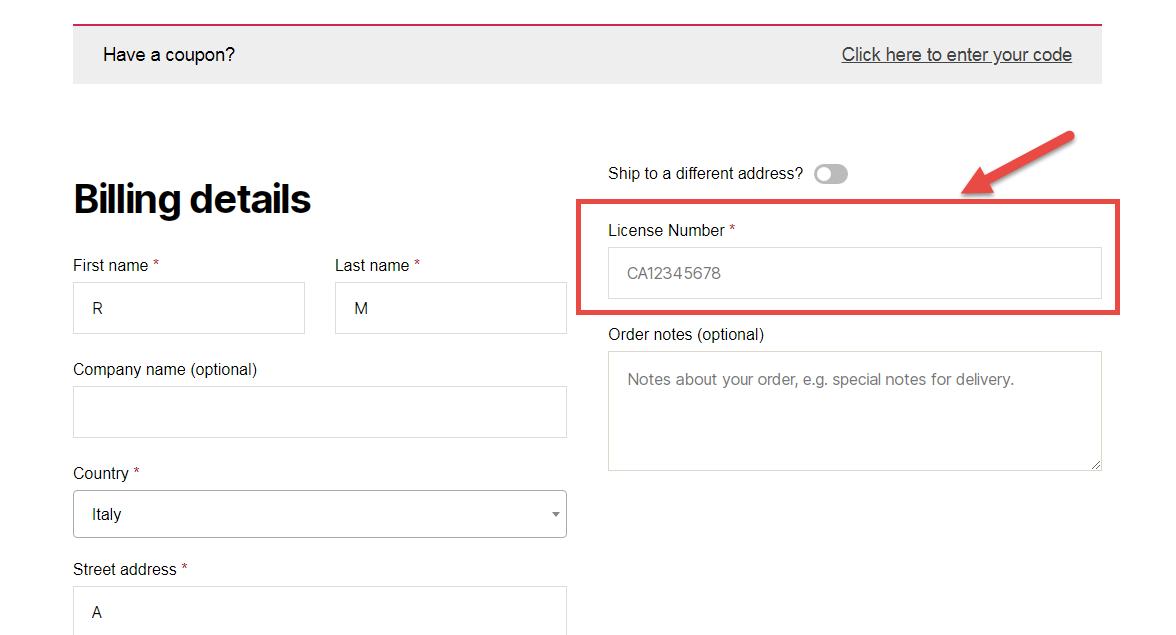
Let’s imagine you want to add a custom checkout field (and not an additional billing or shipping field) on the WooCommerce Checkout page. For example, it might be a customer licence number – this has got nothing to do with billing and nothing to do with shipping.

Ideally, this custom field could show above the Checkout page order notes – right after the shipping form. It will feature a label, an input field, and will be required.

So, here’s how you do it – hope it helps you understand that anything is possible with WooCommerce!

Continue reading WooCommerce: How to Add a Custom Checkout Field

WooCommerce: Add Content to a Specific Order Email

Customizing WooCommerce emails via the WordPress dashboard is not easy and – sometimes – not possible. For example, you can’t edit or add content to them unless you’re familiar with code.

Well, here’s a quick example to learn how to add content to any WooCommerce default order email. In this case study, our goal is showing an upsell to get buyers to go back to the website and buy with a coupon code. Enjoy!

Continue reading WooCommerce: Add Content to a Specific Order Email