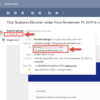
In a recent Business Bloomer Club discussion, a member sought advice on simplifying WooCommerce order confirmation emails by displaying only the main product name, without any variation details.
WooCommerce typically includes both the product name and chosen variation attributes in order emails, which can sometimes be overwhelming and cluttered for customers.
To achieve a cleaner look, two WooCommerce filters can be applied to exclude these variation attributes.
Here’s the snippet that enables this adjustment.
/**
 * WooCommerce:
 * Remove the variation attributes from the product title
 **/
add_filter( 'woocommerce_product_variation_title_include_attributes', '__return_false' );
add_filter( 'woocommerce_is_attribute_in_product_name', '__return_false' );
Conclusion
This code snippet ensures a more concise and user-friendly order overview in emails by showing only the main product name. This small change enhances readability and creates a streamlined order confirmation for customers, particularly useful for stores with a lot of variations or complex product names. By leveraging WooCommerce’s filters, you can easily adjust the email format without affecting the main product page display.