WooCommerce: How to Increase Your Website Opt-In Rates?

This is a guest post by Maarten Belmans of Studio Wombat – if you like the article, make sure to thank him in the comments!

Popups…. they sometimes feel like the necessary evil of ecommerce websites. We all see them several times a day, and we click away from them just as often.

On the other hand, if you run one or more ecommerce websites, it’s hard to ignore them completely. After all, anyone with an email marketing campaign needs a way to capture the email addresses of potential customers.

Unfortunately, since few people get excited by popups while they’re browsing, it shouldn’t come as a surprise that the average opt-in rate on a website averages 1.95%. That’s not a very impressive number.

If you are trying to grow your email list, however, you’re probably looking for a new, fun, gamified way to capture email addresses – without annoying your users. Continue reading WooCommerce: How to Increase Your Website Opt-In Rates?

WordPress: The 10 Commandments of Content Marketing (WC Rome 2017)

I had the pleasure to speak at WordCamp Rome 2017. Yes, the very first WordCamp in my hometown (I left Rome in 2007 to move to Ireland)!

I was super happy to present a talk called “The 10 Commandments of Content Marketing” (OMG how difficult it was to speak in English in front of my Italian friends…).

The talk covered my 5 years of content marketing, and how I’ve seen it all while creating content on my WordPress website: during the first 2 years I wasted time and energy to write blogs no one would read. Then I found my inspiration, my path, my content strategy – and in the last 3 years website traffic has risen from 0 to 15,000+ users (and still growing) per week. Now my blog is my only source of sales leads.

I first and foremost described what mistakes (sins) I made. What about saving 2 years of your life?

Then I listed the “10 Commandments of Content Marketing” – 10 simple tips you can take away to increase your website traffic and focus on the only purpose of content marketing: teaching.

In the final part of the talk, I recommended a few WordPress plugins and email marketing strategies to implement the whole system. Continue reading WordPress: The 10 Commandments of Content Marketing (WC Rome 2017)

Storefront Theme: How To Add A Full Width Slider

Storefront is great theme for launching an online store. It’s getting popular due to its simplicity and compatibility with WooCommerce. But one of the major drawback is it does not have a built-in slider section. Since it’s one of the most requested features of support forums in this tutorial we will demonstrate how to add a full-width slider to the StoreFront homepage using Storefront Add Slider plugin.

Using Storefront Add Slider you can add any slider shortcode (Meta Slider, Smart Slider 3, Soliloquy, Revolution Slider, LayerSlider shortcode) to your Storefront theme Frontpage. Let’s see how we can add a full width homepage slider. We will use the Meta Slider but the same process will apply to any slider plugin.

Continue reading Storefront Theme: How To Add A Full Width Slider

WooCommerce: “Is This a Gift?” Checkbox @ Single Product Page

A client of mine asked me to code a checkbox on the single product page called “Is this a gift?”. They noticed that their customers who want to gift the product to a friend get confused with the “Shipping to a different address” form in the WooCommerce checkout.

So, what about renaming “Shipping to a different address” into “Who is this gift for?” if a “gift” is in the cart? Well, this snippet does just that and you can adapt it / customize it to your specific case. Continue reading WooCommerce: “Is This a Gift?” Checkbox @ Single Product Page

WooCommerce: How to Display Variations with Color / Size Buttons?

Displaying product pages nicely is the entrepreneur’s dream.

Good UX means a much higher probability the interested customer is going to add to cart and complete the checkout.

However, WooCommerce variable products come with annoying dropdowns for each attribute (color, size, style, etc. depending on what options you have set up). And as you’ve already got a hint of my personal opinion, dropdowns are UX-killers.

Today, we take a look at handy plugins you can use to display product options (variations) in a user-friendly way. I’ve used these on many websites and they’re pretty reliable. As usual, it’s just the click of a button!

Continue reading WooCommerce: How to Display Variations with Color / Size Buttons?

WooCommerce: Turn Checkout Field Into a Drop-down

Talking about UX optimization, the WooCommerce checkout is where you should focus most of your time. Shopping cart abandonment is a huge issue – think about hidden charges, lack of payment methods, checkout bugs and, also, too many checkout fields to fill out manually.

Today, we will see how to turn a checkout text field into a select dropdown. Why not let customers pick from a list instead of typing in? Enjoy!

Continue reading WooCommerce: Turn Checkout Field Into a Drop-down

WooCommerce: Display YITH Wishlist Buttons @ Shop Page

This week’s snippet is about one of the most popular WooCommerce plugins on the WordPress repository: YITH WooCommerce Wishlist developed by YITHEMES.

With over 500,000+ active installations, you can probably understand why this is extremely on demand. Having a “wishlist” on your WooCommerce website is a great idea: customers can save their desired products and get back later to complete the purchase.

One of the most requested customizations of such plugin is to display the wishlist buttons on the shop (also called product archive or product loop) pages, under each product’s add to cart button. And the fix is extremely simple! Continue reading WooCommerce: Display YITH Wishlist Buttons @ Shop Page

WooCommerce: How to Edit Product Prices in Bulk?

I’m pretty sure that during one of those Black Friday sales all you wanted to do was to apply a bulk discount to your WooCommerce products without having to generate a coupon code.

Let’s not forget that despite coupons are trackable and you can assess your marketing efforts with their usage statistics, requiring the user to take one additional step at checkout (entering the correct coupon code) reduces your sales conversion rate (the same applies with useless checkout fields by the way – less work to do, higher conversion rate).

In today’s post, we’ll see what are the 3 options I recommend in order to apply bulk store discounts. It pretty much depends on your product types (simple vs variable for example) and whether you want to do this via the settings or with a little bit of PHP.

Continue reading WooCommerce: How to Edit Product Prices in Bulk?

WooCommerce: How To Become an Advanced Developer?

Well, get ready for a 2,700+ words article: becoming a WooCommerce expert won’t take you just a couple of days.

A few months won’t be enough either.

If you want to join that very small group of advanced freelancers and agencies that exclusively work with WooCommerce clients and charge top dollar, if you want to become a WooCommerce authority and build a successful career, if you want clients to come to you as opposed to you chasing them, well – you need to digest and assimilate what I’m about to tell you.

In this (long) article I will help you understand what is advanced WooCommerce, and then break this down into 5 simple steps.

Five makes-a-lot-of-sense steps you should follow in order to complete your journey.

So, want to become a WooCommerce ninja? A WooCommerce wrangler? A WooCommerce guru?

Well, despite I dislike all those ninja-like “terms”, let me tell you a thing or two. Then, join me in the comments and let’s keep the conversation going.

Continue reading WooCommerce: How To Become an Advanced Developer?

WooCommerce: Send Checkout User Info to Email Recipient

When my blog readers become official Business Bloomer supporters, a few custom fields are conditionally displayed on the WooCommerce checkout (thanks to this snippet or this other snippet).

For example I show a custom user Twitter field. Thanks to the snippets, this is automatically saved into the WordPress User Profile page. But as I love to thank each Business Bloomer supporter on Twitter, I wanted to generate an additional email reminder (to myself, or to an assistant’s email address for example) with the Twitter username I should be thanking. You might need something like this if you need to send a new customer email address to a coworker. Or maybe a new address to a dropshipper…

So, how do you send a custom email with some user information, after such user completes the checkout and a new WooCommerce order is created? Continue reading WooCommerce: Send Checkout User Info to Email Recipient

WooCommerce: Assign Free Shipping to a Single Product

Believe it or not, the answer to this very frequent question is inside the WooCommerce settings… so don’t worry too much about coding if you’re not a developer or purchasing yet another premium WooCommerce plugin!

From the WooCommerce shipping rates, you can select “Free Shipping” as a method but that would apply to ALL products – so how do you override the shipping settings and allow a single product to have free shipping, while keeping all the others on a Flat rate?

Continue reading WooCommerce: Assign Free Shipping to a Single Product

WooCommerce: What Are the Top Websites Powered by Woo?

Sometimes your WooCommerce web design clients need a little extra convincing.

Well, I have used the “NYT trick” quite a few times (don’t tell me you haven’t done that at least once)… which goes like this:

If the New York Times is using WordPress there must be a reason or two, no?” *facepalm*

So, the same applies to WooCommerce. Is WooCommerce scalable? Is WooCommerce just for small businesses? Is WooCommerce hard to maintain? How many products can WooCommerce handle?

Or is it that lots of great websites (more than 30% of them apparently) are powered by WordPress and a percentage of them by WooCommerce, including “big” ones?

Continue reading WooCommerce: What Are the Top Websites Powered by Woo?

WooCommerce: What Are the Must-Use Plugins?

Ah, if only there were a “simple” WooCommerce project! We would all use the same plugins, copy and paste the same content and the world would be all the same 🙂

So, let’s be clear about this question. There is no must-use plugins list for WooCommerce, as each website is custom and therefore needs different functionalities.

Having said that, many WooCommerce developers use a few identical plugins on almost every project, and this post contains an answer to that. Continue reading WooCommerce: What Are the Must-Use Plugins?

WooCommerce: Add an Icon to the Add to Cart Buttons

Ecommerce is all about user experience, and making it easier for people to add to cart and checkout smoothly. Reducing the number of checkout fields is a great idea for example – as well as graphically communicating your number 1 objective: “please add to cart now!”.

So, how do you add an icon (or an HTML symbol) to the add to cart buttons in WooCommerce? This can be done in two ways – via CSS if you want to show Fontawesome Icons or via PHP if you prefer to use a simple HTML unicode symbol.

Let’s take a look at both methods!

Continue reading WooCommerce: Add an Icon to the Add to Cart Buttons

WooCommerce: How to Test Geolocation?

Great question, isn’t it?

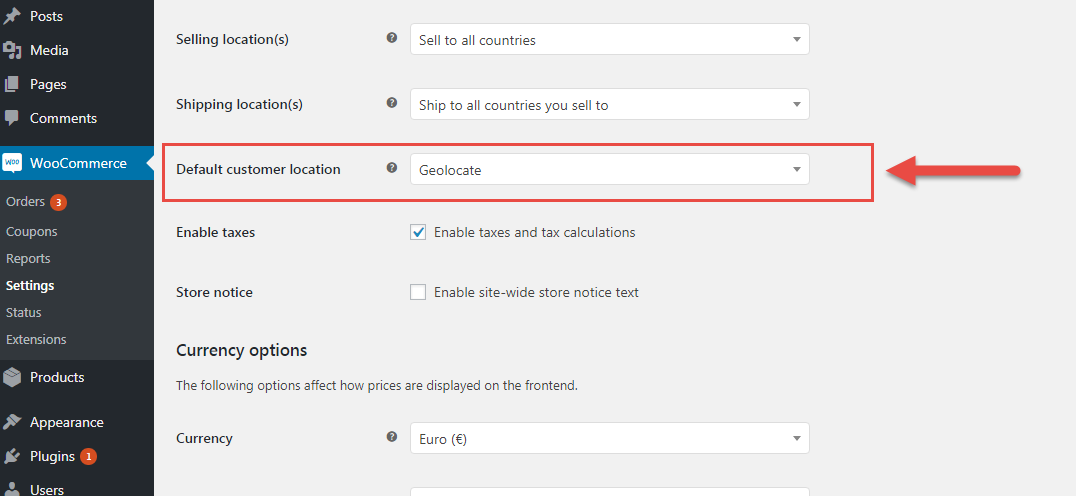
How do you make sure your shipping, taxes and currency settings are working properly when they depend on geolocation and you can only test from a single world location?

WooCommerce uses a free geolocation service called MaxMind. By default this is active via the settings but can be disabled. The set of functions (or class) that WooCommerce uses is in the /includes folder, and it’s called Class WC_Geolocation.

Continue reading WooCommerce: How to Test Geolocation?